

How to Monitor Your Brand in Microsoft Copilot
Microsoft Copilot is built into Windows, Edge, and Microsoft's office suite, which means millions of people now see AI-generated answers that mention or skip your brand every day. This guide covers Microsoft Copilot brand monitoring from the ground up: how to set up a tracking workflow, which metrics to watch, and what to do when Copilot ignores you.

Why Microsoft Copilot Visibility Matters for Your Brand
Microsoft Copilot reaches more users than most marketing teams realize. Microsoft has reported a very large monthly active user base across its commercial and consumer products. That number keeps growing as Copilot becomes a default feature across Windows, Microsoft Edge, and the full Office suite.
Here's what that means for brands. When an enterprise buyer asks Copilot "What are the best project management tools for remote teams?" and your product does not appear, you have lost a touchpoint you never knew existed. Copilot does not just summarize web results the way Bing does. It synthesizes information, names specific brands, and sometimes recommends one product over another. That makes it a new surface for brand visibility, and one that most companies are not tracking yet.
The distribution advantage is especially hard to ignore in enterprise settings. Microsoft has hundreds of millions of paid productivity seats globally, and a large share of Fortune 500 companies have piloted or deployed Copilot inside their organizations. If your buyers use Microsoft products at work, Copilot is already shaping their perceptions of your brand, whether you are paying attention or not.
What Brand Mentions Look Like in Copilot
Before you start monitoring, it helps to understand the different ways Copilot can reference your brand. Not all mentions carry the same weight.
Direct recommendation. Copilot names your brand as a top option or explicitly suggests it. This is the highest-value mention type because users often treat AI recommendations as pre-vetted shortlists.
List inclusion. Your brand appears alongside several competitors in a ranked or unranked list. You are visible, but you may not be positioned favorably. Position within the list matters: brands mentioned first or described most positively tend to get more clicks.
Passing reference. Copilot mentions your brand briefly while discussing a broader topic. Useful for awareness, but not strong enough to drive consideration on its own.
Competitor comparison. Copilot includes your brand in a side-by-side comparison. This can work for or against you depending on how the comparison is framed and whether your strengths are highlighted.
Absent entirely. The most common outcome for brands that have not optimized for AI visibility. Copilot answers the question without mentioning you at all, and the buyer never knows you exist.
One thing to know: Microsoft Copilot in its search-enabled modes draws primarily from the Bing search index, with additional grounding from Microsoft's own content graph. Your Bing visibility directly influences what Copilot says about your brand. If your site ranks poorly on Bing or lacks indexed content for key queries, Copilot is unlikely to surface you.
How to Build a Copilot Brand Monitoring Workflow
Setting up Microsoft Copilot brand monitoring does not require specialized tools on day one. You can start with a manual process and scale up as you learn what matters most for your brand.
Step One: Define your monitoring prompts. Write a broad prompt set that represents the questions your ideal buyers would ask Copilot. Mix high-intent commercial queries ("best [your category] for enterprises") with informational ones ("how to solve [problem your product addresses]"). Include prompts that mention competitors by name, since you want to see where Copilot positions you relative to alternatives. If you need help brainstorming queries, the guide on how AI prompts affect brand visibility can suggest prompts based on your brand and category.
Step Two: Run each prompt in Microsoft Copilot. Open Copilot in Edge or at copilot.microsoft.com and enter each prompt. Record the full response, noting whether your brand appears, where it appears, and which competitors show up alongside it. Screenshot the results for future comparison.
Step Three: Categorize each mention. Tag each result using the mention types described above: direct recommendation, list inclusion, passing reference, competitor comparison, or absent. This gives you a baseline visibility picture you can measure against over time.
Step Four: Track citation sources. When Copilot cites external sources, note which URLs and domains it references. These citation sources reveal which content shapes Copilot's answers about your category. If a competitor's blog post keeps getting cited, that tells you exactly what content you need to create or improve.
Step Five: Set a monitoring cadence. Copilot responses change as Bing re-indexes content and as Microsoft updates its models. Weekly monitoring is a good starting point for most teams. For competitive categories, daily checks on your highest-priority prompts will catch shifts faster.
For teams that want to scale beyond manual tracking, AI visibility platforms can automate this process across multiple AI search engines at once. PromptEden, for example, monitors brand mentions across five AI surfaces spanning search, API, and agent categories, with scheduled prompt tracking and automated response recording.
Key Metrics to Track in Copilot Responses
Raw mentions are a starting point, but not the full picture. These are the metrics that actually tell you whether Copilot is helping or hurting your brand.
Presence rate. The percentage of your tracked prompts where Copilot mentions your brand at all. If you monitor a stable prompt set and your brand appears in less than half the responses, your presence rate likely needs work. This is the most basic metric, but it sets your baseline and tells you how much ground you need to cover.
Recommendation frequency. How often Copilot actively recommends your brand versus mentioning it. A brand that appears in lists but never gets recommended has a different visibility profile than one Copilot positions as a top pick. Track both the raw count and the ratio of recommendations to total mentions.
Position in response. Where your brand appears within Copilot's answer matters more than many teams expect. Brands mentioned in the first paragraph or at the top of a list get more attention than those buried further down. Track your average position over time to spot upward or downward trends.
Competitive share of voice. Compare your presence rate and recommendation frequency against your primary competitors. If one rival appears much more often than your brand, that gap quantifies the visibility problem and helps you prioritize which queries to focus on.
Citation source overlap. Track which domains and URLs Copilot cites when it mentions or skips your brand. If Copilot consistently cites your competitor's content as the authoritative source in your category, you have a content gap to address.
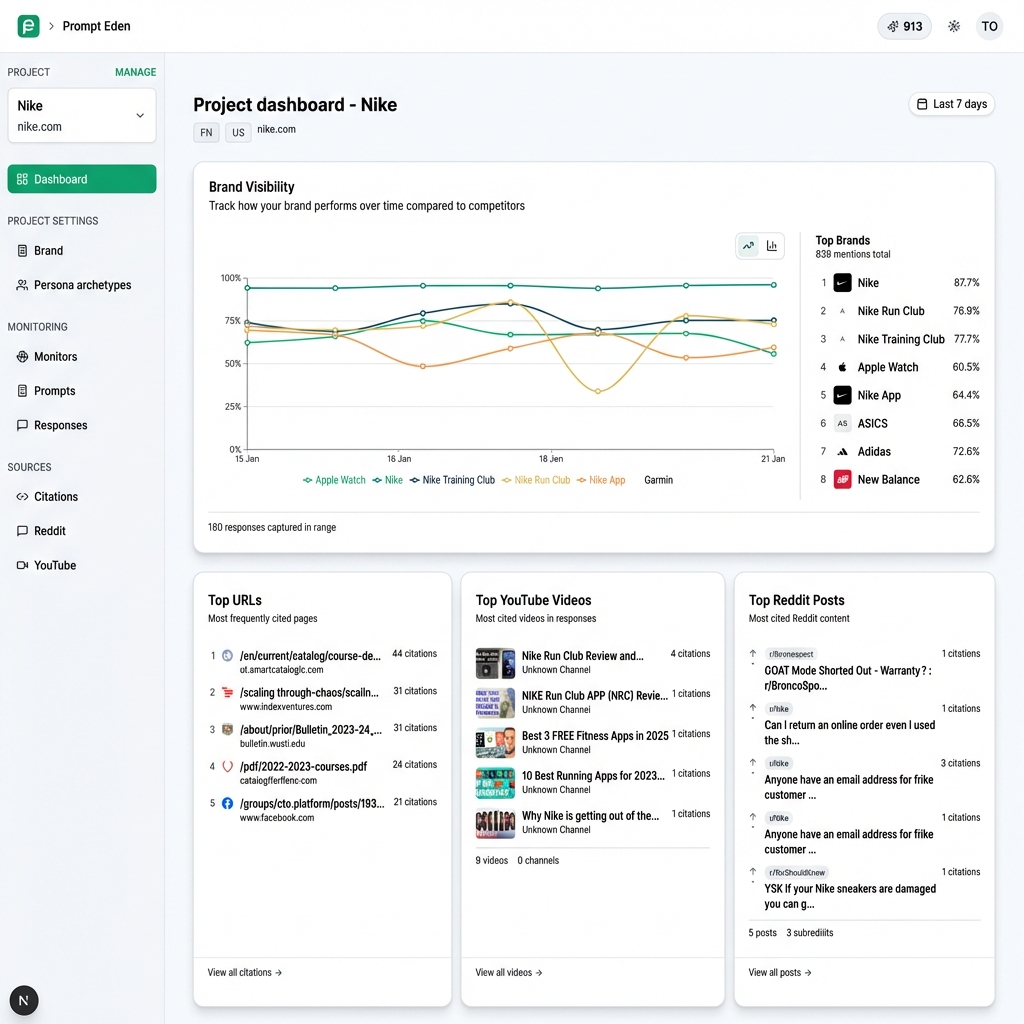
These metrics map closely to how dedicated AI monitoring tools measure visibility. PromptEden's Visibility Score uses four components (presence, prominence, ranking, and recommendation) to produce a single normalized score, which gives teams a shorthand way to track progress without juggling multiple spreadsheets.
How to Improve Your Copilot Visibility
Tracking visibility is only useful if you act on what you find. Here are the highest-return actions for improving how Copilot represents your brand.
Optimize for Bing search. Because Copilot grounds its answers in the Bing index, your Bing rankings directly affect your Copilot visibility. Make sure your site is verified in Bing Webmaster Tools, your key pages are indexed, and your content targets the same queries you are monitoring. Many SEO teams focus exclusively on Google and overlook Bing entirely, which creates an easy opportunity for teams willing to close that gap.
Build citation-worthy content. Copilot prefers to cite content that provides clear, definitive answers. Pages that include specific data points, step-by-step instructions, and direct comparisons get cited more often than vague marketing pages. Structure your content with clear headings and concise definitions. Aim for self-contained answer blocks that AI can extract without needing surrounding context.
Earn third-party mentions. Copilot does not only cite your own website. It pulls from review sites, industry publications, forums, and comparison articles. A positive mention on a well-indexed third-party site can influence what Copilot says about your brand just as much as your own content. Prioritize coverage on sites that already rank well in Bing for your target queries, and make it easy for reviewers to reference your product accurately.
Use structured data. Schema markup helps search engines and the AI systems built on top of them understand your content more precisely. Add Organization, Product, FAQ, and HowTo schema to your key pages. While Microsoft has not confirmed that structured data directly influences Copilot answers, it improves your Bing visibility, which feeds into Copilot's grounding data.
Monitor across platforms, not just Copilot. Your buyers do not limit themselves to one AI tool. Someone who asks Copilot at work might ask ChatGPT on their phone and Perplexity on their laptop. A brand that performs well in Copilot but is absent from other AI search engines has a fragmented visibility profile. Cross-platform brand monitoring reveals these blind spots before competitors fill them.
Why Multi-Platform AI Tracking Matters
Different AI platforms give different answers to the same question. A query about "best CRM for small businesses" might return Salesforce, HubSpot, and Pipedrive in Copilot, while ChatGPT recommends Zoho, HubSpot, and Monday.com. Perplexity might highlight a completely different set based on recent reviews it has indexed.
This inconsistency is not a bug. Each platform uses its own data sources, retrieval methods, and model weights. Copilot leans on Bing's search index, while ChatGPT blends training data with browsing capabilities. Perplexity emphasizes real-time web retrieval with heavy citation, and Google AI Overviews draw from the Google index. Your brand visibility varies quite a bit by platform, and a strong position on one does not guarantee visibility on another.
For teams running Microsoft Copilot brand monitoring, Copilot-specific tracking should be part of a broader AI visibility strategy. Start with Copilot if that is where your buyers spend their time, but expand your monitoring to cover the other platforms those same buyers rely on throughout their day. PromptEden tracks brand visibility across five AI surfaces — ChatGPT, Claude, Gemini, Google AI Overviews, and Google AI Mode — which gives teams a single view of how your brand performs across those surfaces without logging into multiple tools.
The brands that win in AI search are the ones that treat visibility as a continuous measurement problem, not a one-time optimization project. Set your baselines, run your monitoring cadence, and use the data to prioritize the content and distribution work that moves your metrics the most.